


You can publish great content on LinkedIn, connect with the right people, and even get thousands of profile views.
But what happens when someone actually visits your profile?
Can they understand what you do? Who you work with? And why they should consider working with you?
This is where many LinkedIn profiles fall short.
Some have a headline that only mentions a job title. Others have an About section full of responsibilities but no clear explanation of their expertise. And many have a banner that looks good but tells visitors absolutely nothing.
Your LinkedIn profile needs to do more than list your professional experience. It should give people a clear picture of what you do and make it easy for the right opportunities to find you.
Here are the 11 areas I'd focus on when optimizing a LinkedIn profile.
1. Start With a Clear, Professional Profile Picture
Your profile picture is one of the first things people notice.
You don't need a professional photoshoot to get this right. A simple, well-lit photograph is enough.
Keep these things in mind:
Use a recent picture where your face is clearly visible.
Choose a clean background without distractions.
Make sure your face isn't too far away or cropped awkwardly.
Wear something that fits your professional environment.
Avoid group photos, filters, and heavily edited images.
One more thing: use the same or a similar photograph across your professional platforms. It makes it easier for people to recognize you.


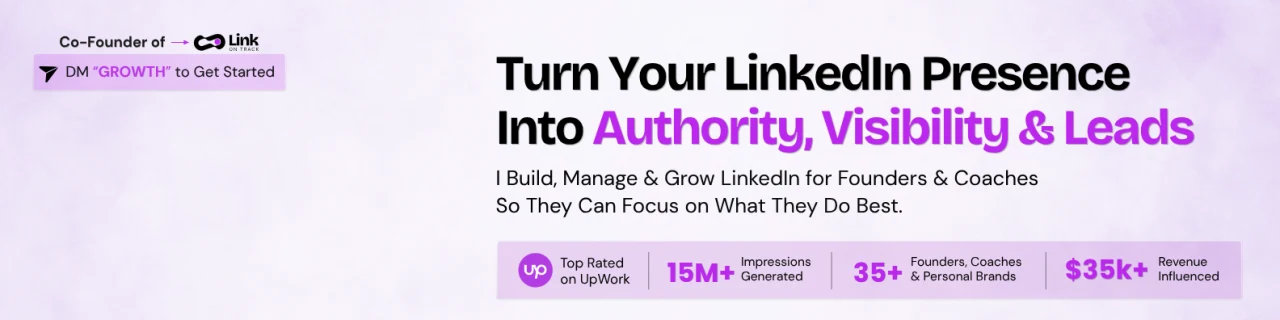
2. Make Your Banner Say Something Useful
Your LinkedIn banner is one of the biggest visual spaces on your profile.
Leaving it blank means missing an opportunity to tell visitors something important about your work.
Instead of adding random graphics or just your name, use the banner to communicate your professional positioning.
For example, if you're a business consultant, your banner could explain who you help and what you help them achieve.
A good banner usually includes:
Your main service or area of expertise.
The audience you work with.
A short statement about the value you provide.
Your website or a relevant call to action.
Keep the design simple. Use readable fonts, consistent colors, and enough spacing.
Also, check how your banner looks on mobile. Text that looks perfectly positioned on desktop can get cropped on smaller screens.

3. Write a Headline That Explains What You Actually Do
This is where many people make a mistake.
They write something like:
"Founder | CEO | Entrepreneur | Business Owner"
But what does that tell a potential client about the business? Not much.
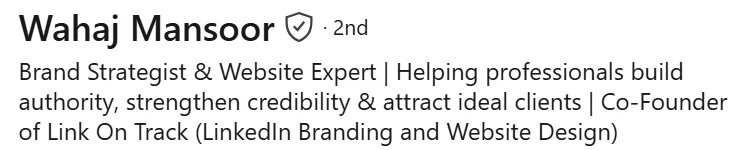
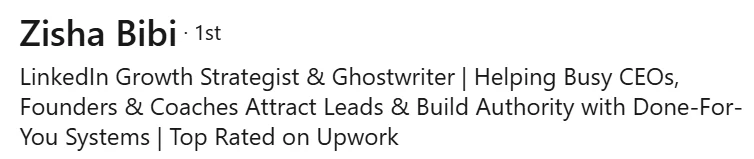
Your headline should help people understand your expertise without making them guess.
A useful structure is:
Your Role + Your Specialty + Who You Help or What You Do
For example:
"LinkedIn Growth Strategist | Helping Founders Build Personal Brands That Attract Clients"
Or:
"B2B Marketing Consultant | Helping SaaS Companies Improve Their Marketing Strategy"
You don't have to use this exact format. The important thing is to communicate your role and specialty clearly.
Include the keywords relevant to your work, especially the terms your potential clients might search for.
And don't try to fit every skill into one headline. A focused headline is much easier to understand.
4. Write an About Section People Actually Want to Read
Your About section is where you can explain your work in more detail. But don't turn it into a copy of your résumé.
Instead of starting with a long list of qualifications, think about what someone visiting your profile would want to know.
A simple structure can help:
Start with what you do.
Use the opening lines to explain your work or the problem you help solve. These lines matter because visitors may need to click "See more" to read the rest.
Explain who you work with.
Mention your target audience. For example, founders, coaches, consultants, SaaS companies, or independent professionals.
Describe your services or expertise.
Explain what you actually do. If you offer multiple services, briefly describe the most relevant ones instead of listing every skill you have.
Add proof.
Include real client results, relevant projects, years of experience, or achievements. Specific examples are more useful than simply saying you're an expert.
End with a next step.
Tell people how they can reach you, explore your services, or start a conversation.
One important tip: write in your own voice. Your About section should sound like something you'd actually say when introducing yourself to a potential client.
5. Use the Featured Section to Show Your Work
If someone is interested in your services, they shouldn't have to scroll through your entire LinkedIn activity to find examples.
That's what the Featured section is useful for.
You can use it to display:
Client case studies.
Your best LinkedIn posts.
Portfolio samples.
Project presentations.
Helpful resources.
Your website or service page.
For example, a graphic designer could feature three selected projects. A consultant could showcase a client case study and a useful industry guide.
Choose work that gives visitors a better understanding of your expertise.
And remember to review this section occasionally. If your services or positioning change, your featured content should change with them.
6. Improve Your Experience Section
Your Experience section should explain what you've done, not just where you've worked.
Adding a job title and company name isn't enough, especially if you're trying to attract clients through LinkedIn.
For each relevant role, explain:
What your position involved.
Which projects or responsibilities you handled.
What skills you used.
What results you achieved.
For example, instead of:
"Responsible for social media management and content creation."
Write something more specific:
"Managed LinkedIn content planning, developed post ideas, created branded visuals, and helped improve the company's professional presence."
If you have measurable results, include them.
For example, mention qualified leads generated, projects completed, audience growth, or improvements in engagement, provided those figures are accurate.
You don't need to describe every task from every job you've ever had. Focus on the experience that supports what you want to be known for today.
7. Add the Right Skills
LinkedIn allows you to add skills to your profile, but adding every skill you've ever used isn't a good strategy.
Think about the services you currently offer and the expertise you want to be associated with.
For example, a personal branding strategist & website designer might include:
Personal Branding
Content Strategy
Profile Optimization
Social Media Management
Web Design
UI/UX Design
Landing Page Design
Website Development
Choose skills that match your current work.
You can also ask people who have worked with you to endorse the skills they've genuinely seen you demonstrate.
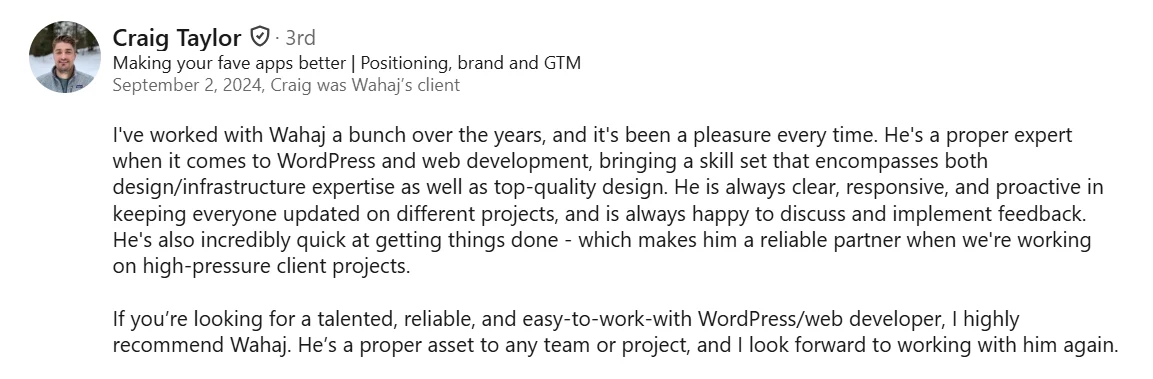
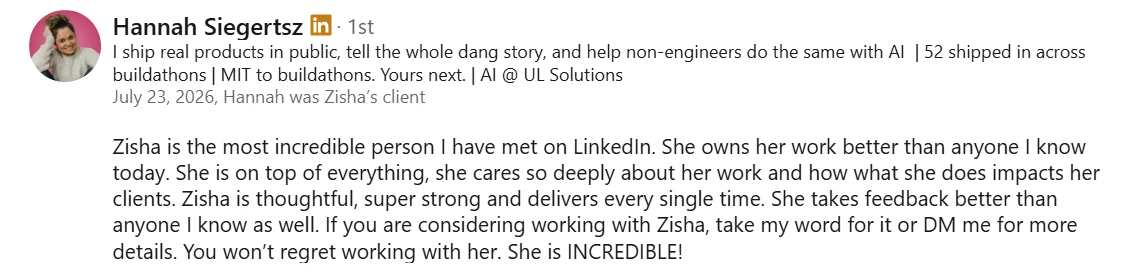
8. Ask for Recommendations
Recommendations are useful because they let other people talk about their experience working with you.
A potential client might understand your services from your profile, but a genuine recommendation can help them understand how you work with clients.
Reach out to previous clients, colleagues, or managers and ask for a recommendation.
You can make the request easier by reminding them of the project you worked on together.
A useful recommendation should ideally mention:
What you worked on together.
What your contribution was.
How you approached the work.
What they appreciated about the experience.
Don't ask people to write exaggerated praise. A specific, honest recommendation is much more convincing.
9. Customize Your LinkedIn URL
Your LinkedIn profile URL is something you'll share in emails, proposals, websites, and other professional spaces.
A long URL with random numbers doesn't look as clean as a customized one.
Instead of:
linkedin.com/in-Link-on-track-839274615/
Use something simpler, such as:
To change it:
Open your LinkedIn profile.
Find the public profile URL section.
Select the edit option.
Choose an available URL using your name.
Save your changes.
Keep it short, recognizable, and easy to share.
10. Make Your Contact Details Easy to Find
If someone decides they want to work with you, make sure they don't have to search for a way to contact you.
Add your contact details so potential clients can easily reach you.
Depending on your work, you can include:
A professional email address.
Your business website.
Relevant contact information.
A booking link, if you take consultations.
You can also use your About section to invite people to send you a message.
Just make sure the next step is clear. If you want potential clients to book a call, don't leave them guessing where to go.
11. Add Relevant Keywords Throughout Your Profile
Consider the words your ideal clients would use when searching for someone with your skills and expertise.
Would they search for a "LinkedIn profile optimization specialist," a "content strategist," or a "website designer"?
These are the kinds of terms worth considering.
Use relevant keywords naturally in your:
Headline.
About section.
Experience descriptions.
Skills section.
For example, if you offer LinkedIn profile optimization, make sure that phrase appears naturally in the relevant parts of your profile.
Don't force keywords into every sentence. Your profile still needs to read naturally and explain your work clearly. The goal is to help both people and LinkedIn understand what you specialize in.
Profile optimization is a great starting point, but it shouldn't work in isolation.
Your content should demonstrate the expertise mentioned in your profile. Your engagement should help you build relationships with relevant people. And your services should be easy to understand when someone is ready to take the next step.
These elements need to support one another.
At Link On Track, we help founders, consultants, coaches, and professionals improve their LinkedIn presence through profile optimization, personal branding, and content design.
If your profile doesn't reflect the quality of your work, let's change that.
Explore our LinkedIn services at Link On Track.